Surcharges and discounting in WorkGuru lets you apply transaction-level surcharges and discounts across Quotes, Projects, Stock Sales, and Invoices — as a percentage of the combined billable product and task subtotal.
How it works
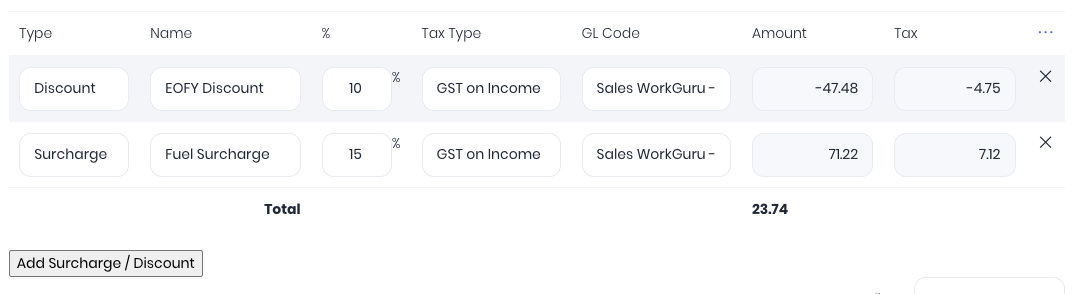
Once you have enabled the surcharge and discount function on your WorkGuru tenant, you can add one or more surcharge or discount lines to any transaction. Each line has a description (e.g. "Fuel Surcharge", "Restocking Fee", "EOFY Discount" etc) and a percentage value. WorkGuru calculates the dollar amount automatically and stores it alongside the percentage for clean accounting integration. Percentage lines are non-compounding — each one calculates against the base subtotal, not against each other. This keeps the maths predictable and the audit trail clean. The surcharge and discount information can then be displayed on your document templates by adding the relevant merge fields as required.
Templates & Presets
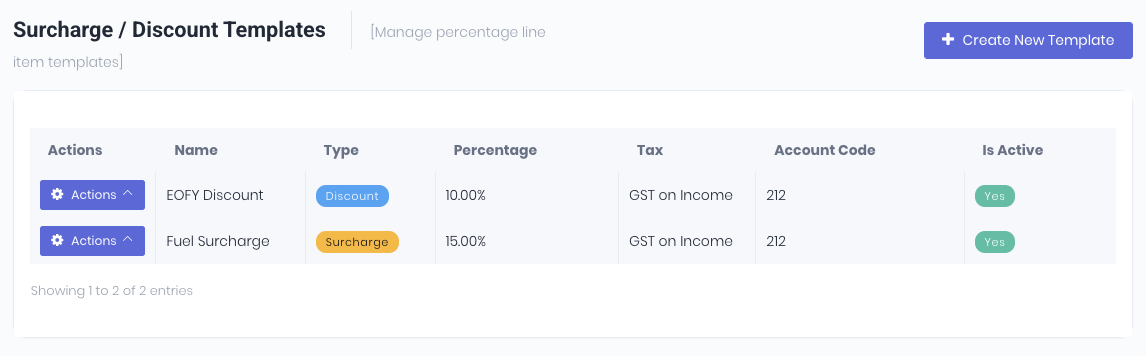
Create preset surcharge or discount templates so your team can apply common surcharges or discounts with a single click. Project templates also support percentage lines, so your standard project setups flow through automatically.
Full Workflow Integration
Percentage lines follow the WorkGuru lifecycle: Quote → Project/Stock Sale → Invoice. When you convert a quote to a project, the percentage lines come with it — with back-references for full traceability.
Accounting Integration
Surcharge and discount values sync cleanly to Xero, MYOB, and QuickBooks Online. Your accounting system sees real line items, not calculated fields — no reconciliation surprises.
Was this article helpful?
That’s Great!
Thank you for your feedback
Sorry! We couldn't be helpful
Thank you for your feedback
Feedback sent
We appreciate your effort and will try to fix the article