When setting up tables to display recurring information in WorkGuru, they have a couple of pre-requisites to be completed so they are able to display the information correctly. These tables should have a minimum of two rows, the header row, and the row that will be duplicated with the required merge fields/columns.
Header Row
The table MUST have a header row, even if it is blank. WorkGuru won't display table rows without a header, even if the row fields have been correctly added. There should be no merge fields added to the header row. Header rows columns do not have to match the repetition row columns.
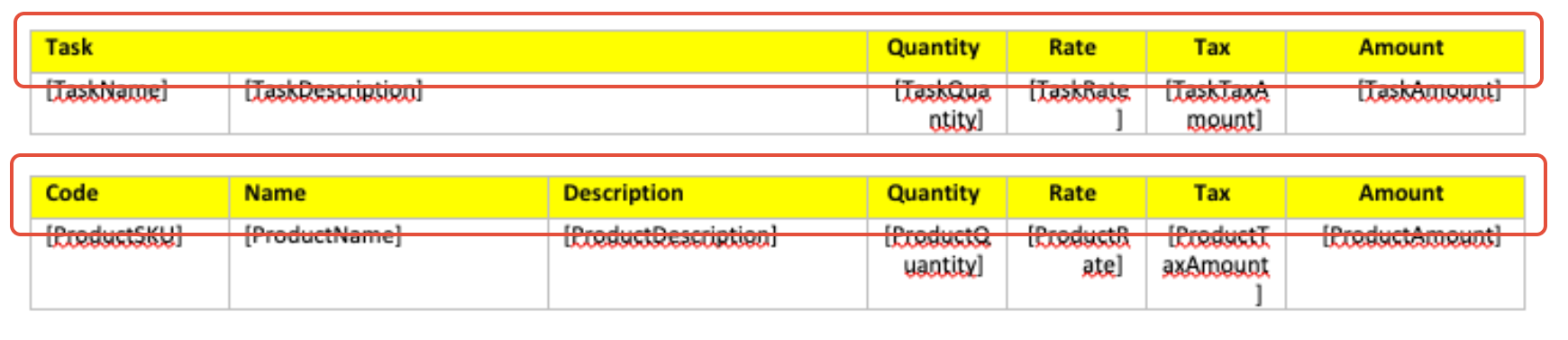
Repetition Row
The repetition row is where you enter the Table's supported merge fields. Only one row is required as when the document is generated, WorkGuru automatically repeats the relevant table row for each applicable record.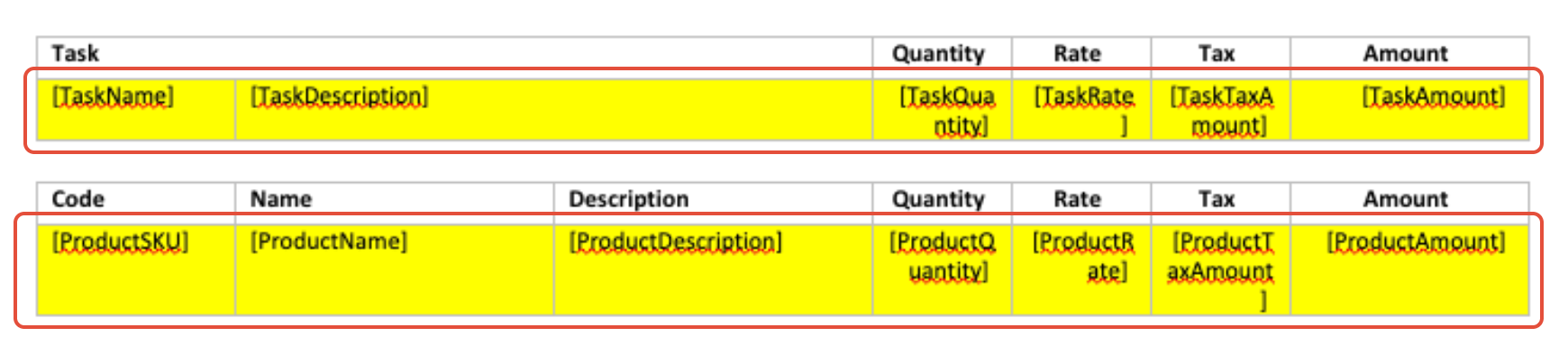
Table Properties
The table's alt text description field needs to be filled in so WorkGuru knows which data it needs to populate the rows with. If you are setting up a table from scratch. To access the table's alt text description field, right click the table and open the Table Properties.
Select the Alt Text tab:
Enter the following text in the Description field depending on the type of table it is:
- Products/Costs - Products
- Product/Cost options - ProductOptions
- Tasks/Labour - Tasks
- Tasks/Labour options - TaskOptions
- Timesheets - Timesheets
- Purchase orders - Purchases
- Purchase order line detail- PurchaseLines
- Purchase orders grouped by supplier or PO - AltPurchases
- Invoice payments - Payments
- Lead activities - LeadActivities
- Project/Quote phase summary - PhaseSummary
- Project/Quote phase details - PhaseDetails
- Invoice summary - InvoiceSummaries
- Purchase order summary - POSummaries
- Stock usage summary - StockUsageSummaries
- Production job output - Output
- Project notes - Notes
Nested Tables
A nested table in it's most basic form is a table with another table sitting inside of it, the only table type that WorkGuru has which supports nested tables is the PhaseDetails table for quotes/projects that have phases applied. 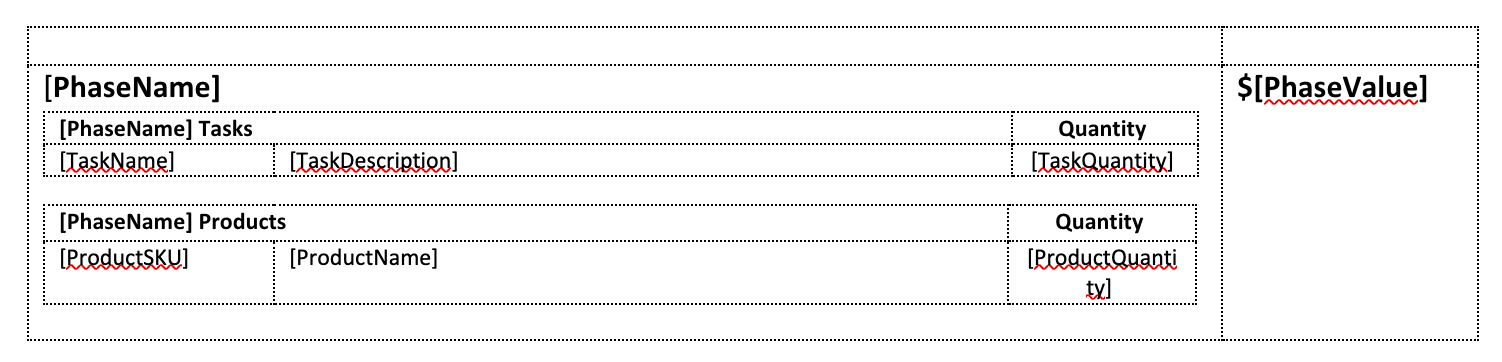 A nested table is a table placed inside the Phase Details table so that line items can be grouped and displayed underneath their relevant phase. The supported nested table types are:
- Products - see Product Table Field Reference
- Tasks - see Task Table Field Reference
- Purchases -see Purchase Table Field Reference
When using Phase Details with nested Products, Tasks or Purchases, each nested table must also have its corresponding Alt Text configured.
For example:
- Outer phase table – PhaseDetails
- Nested product table – Products and/or
- Nested task table – Tasks and/or
- Nested purchase table – Purchases
Because PhaseDetails can contain nested tables, complex templates may not always convert cleanly to PDF.
If a Phase Details table is formatted incorrectly when printed directly to PDF, try:
- Printing the document from WorkGuru as a DOCX file.
- Opening the document in Microsoft Word.
- Converting or saving the document as a PDF from Word.
This can provide better results for complex nested table layouts.
Was this article helpful?
That’s Great!
Thank you for your feedback
Sorry! We couldn't be helpful
Thank you for your feedback
Feedback sent
We appreciate your effort and will try to fix the article