WorkGuru supports percentage-based surcharges and discounts that can be applied to Quotes, Projects, Stock Sales, and Invoices. These are calculated as a percentage of the combined product and task subtotal on each transaction. Before you can use surcharges and discounts, the feature must be enabled in your tenant settings.
How to Enable
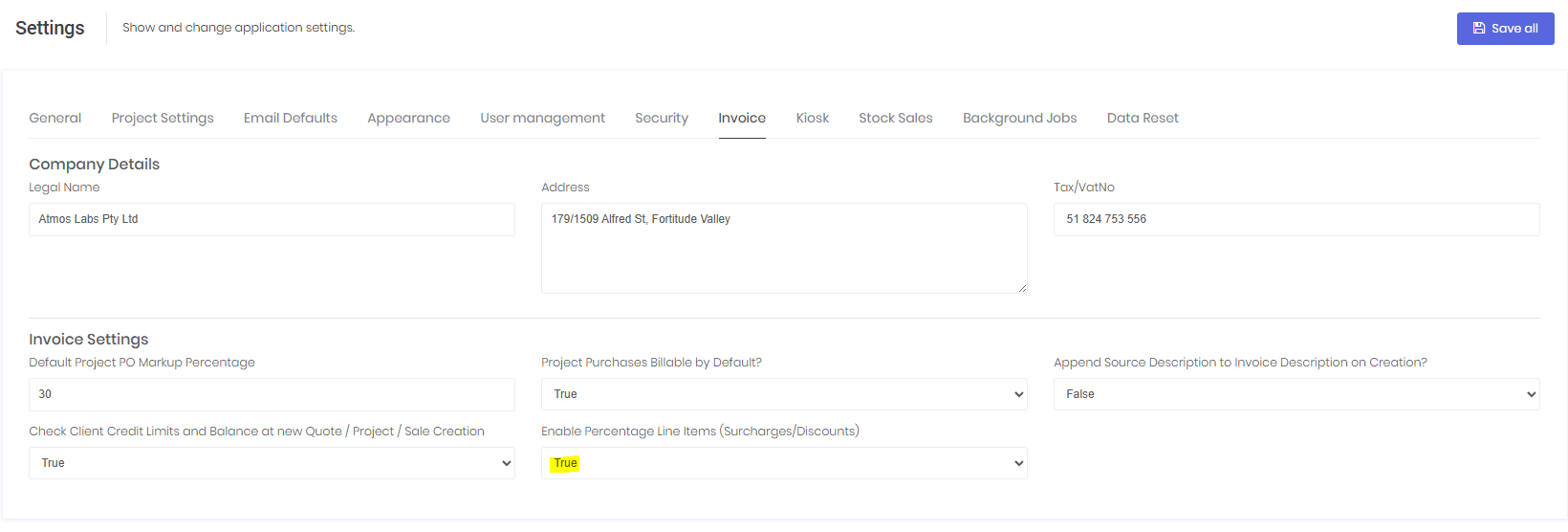
To enable the Surcharges & Discounts feature:
- Navigate to Settings from the main menu.
- Click the Invoice tab.
- In the Invoice Settings section, locate the Enable Percentage Line Items (Surcharges/Discount) dropdown.
- Set the value to True.
- Click Save all in the top-right corner.
What Happens When Enabled
Once the feature is turned on:
- An Add Surcharge / Discount button appears on the edit pages for Quotes, Projects, Stock Sales, and Invoices.
- A new Surcharge / Discount Templates page becomes available under Administration, allowing you to create reusable presets.
- Project Templates gain the ability to include surcharge and discount lines that are automatically applied when a new project is created from the template.
- Surcharges and discounts flow through the transaction lifecycle — from Quote to Project or Stock Sale, and then on to Invoice.
Disabling the Feature
If you set the toggle back to False, the surcharge and discount sections will be hidden from all transaction pages. Any existing surcharge or discount lines on saved transactions are preserved in the database and will reappear if the feature is re-enabled.
Was this article helpful?
That’s Great!
Thank you for your feedback
Sorry! We couldn't be helpful
Thank you for your feedback
Feedback sent
We appreciate your effort and will try to fix the article