The To-Do List table is used to print all To-Dos assigned to a project or production job.
Document Compatibility
The To-Do List table is available for use on the following document templates:
- Projects - see Project Document Templates
- Production Jobs - see Production Job Document Templates
To-Do List fields are table fields, meaning they must be placed inside a correctly configured table in your Word document template. Merge fields and table Alt Text are case sensitive and must be entered exactly as shown below. For detailed instructions, see Table Field Setup in WorkGuru Document Templates.
Setting Up a To-Do List Table
To-Do List merge fields must be placed inside a correctly configured table. The table requires:
- A header row. Headers can be customised to suit your document.
- A repetition line row containing your merge fields
- The correct Alt Text Description. Set the table’s Alt Text Description to:
- ToDoLists
When the invoice document is generated, WorkGuru will repeat the repetition row for each To-Do associated with the project or production job.
To-Do List Merge Fields
| Description | Merge Field |
|---|---|
Task Name | [ToDoTask] |
To-Do Name | [ToDoName] |
Priority | [ToDoPriority] |
| Description | [ToDoDescription] |
Assigned User Full Name | [ToDoUser] |
Due Date (DD/MM/YYYY) | [ToDoDueDate] |
| Completed Date (DD/MM/YYYY) | [ToDoCompletedDate] |
| Task Phase | [ToDoTaskPhase] |
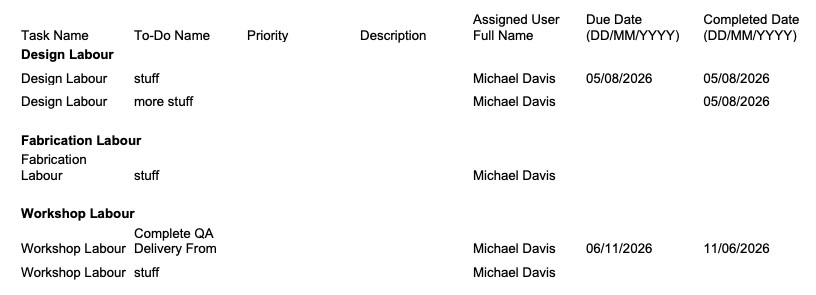
Note: The to-do list table output is grouped by task name by default.
Troubleshooting
Table Does Not Populate
Check that:
- The Alt Text Description is correct.
- Capitalisation matches the required table name - alt text descriptions are case sensitive.
- There is only one table of the same type on the document.
- The table is supported by the document type.
- There is applicable data to display.
- The table has a header
Merge Fields Appear in the Generated Document
If fields such as [ToDoName] appear instead of actual values, check:
- The spelling of the merge field.
- Check capitalisation - merge fields are case sensitive.
- Confirm the field belongs to the table type being used.
- Confirm the field is supported by the document type.
Table Formatting Is Incorrect
Check that:
- Header and repetition row columns align.
- Cells have not been incorrectly merged.
- Nested tables are configured correctly.
- Each table has the correct Alt Text Description.
Was this article helpful?
That’s Great!
Thank you for your feedback
Sorry! We couldn't be helpful
Thank you for your feedback
Feedback sent
We appreciate your effort and will try to fix the article