The Sales Hub replaces scattered lists and manual follow-ups with a single, execution-first view of your entire pipeline. From the moment a lead lands to the day you convert it into a project, every step lives in one place.
Pipeline at a glance
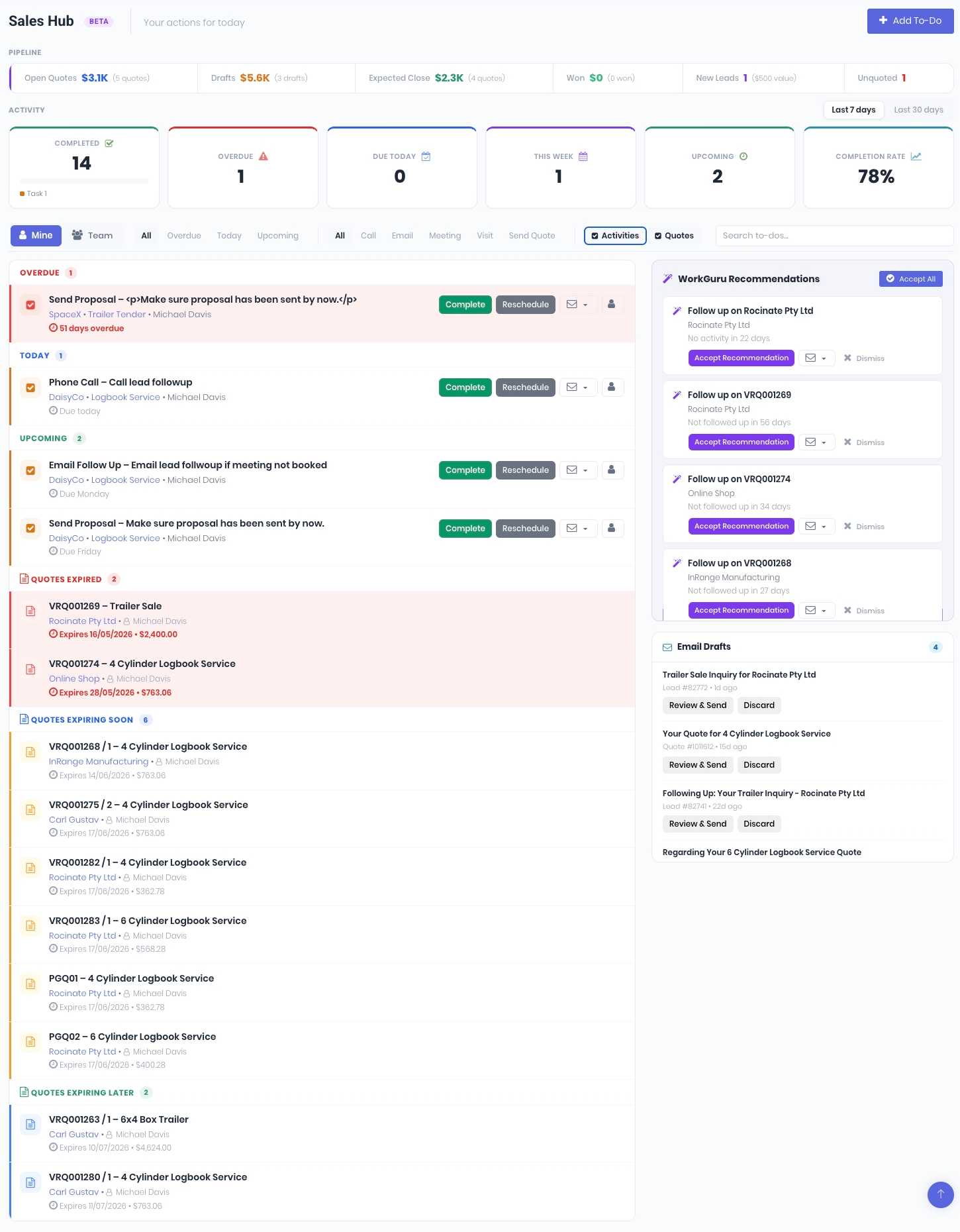
Your pipeline is broken into customisable stages - from New through Discovery Meeting Booked, Proposal Submitted, and Verbal Approval - so you always know where every deal stands. Each lead carries a close probability, forecast close date, and expected budget, giving you real visibility over future revenue.
Activity-driven selling
Log calls, emails, meetings, and site visits against each lead. The Sales Hub surfaces your overdue activities, items due today, and upcoming follow-ups in a prioritised list, so nothing slips through the cracks. Toggle between My Activities and Team view to manage your own pipeline or coach across the sales floor.
Metrics strip
A top-of-page metrics bar shows your open quotes, drafts, expected close value, new leads, and unquoted leads at a glance. Filter by 7-day or 30-day windows to track momentum over time.
AI-drafted emails
Need to follow up with a prospect? WorkGuru can now draft personalised email content for you, pulling context from the lead's history, linked quotes, and your configured templates. Review, edit, and send - all without leaving the Sales Hub.
Lead → Quote → Project → Invoice
The Sales Hub isn't a standalone CRM - it's wired directly into WorkGuru's quoting and project engines. Convert a won lead into a quote with one click, and the full lifecycle flows from there.
Make the Sales Hub Yours
The Sales Hub doesn't just give you a pipeline - it tells you what to do next. The new CRM Settings panel lets you fine-tune how WorkGuru generates follow-up recommendations and how AI drafts your emails, so the system works the way your team sells.
Sales Recommendation Settings
Configure the follow-up cadence that matches your sales rhythm. Set how many days of inactivity should trigger a recommendation for quote follow-ups, unquoted leads, and general lead follow-ups - each with its own threshold. WorkGuru watches your pipeline and surfaces the right nudge at the right time, so no deal goes cold because someone forgot to check in.
Key Account Management
Flag your most important clients by price tier or individually, and set a separate contact frequency for key accounts. If your biggest customer hasn't heard from you in 30 days, the Sales Hub will let you know - before they start taking calls from your competitors.
AI Email Drafting - Your Voice, Your Rules
WorkGuru's AI engine can draft follow-up emails for you, but it writes them your way. The Custom Instructions field lets you define your company's tone, style, and guardrails. Tell it to use Australian English, keep it direct, never include pricing, always push for a meeting - whatever matters to your brand. Those instructions are baked into every AI-generated draft, so the output sounds like your team wrote it, not a chatbot.
Your prompt, your emails
The AI custom instructions aren't a one-size-fits-all template - they're a direct prompt to the AI engine. Write them the way you'd brief a new sales rep on day one, and every drafted email will follow the same playbook.
Was this article helpful?
That’s Great!
Thank you for your feedback
Sorry! We couldn't be helpful
Thank you for your feedback
Feedback sent
We appreciate your effort and will try to fix the article