Work Areas are designed to stay out of the way of users who don't manage your workshop layout.
The Work Areas permission
Find it under Pages → Tenant in role configuration.
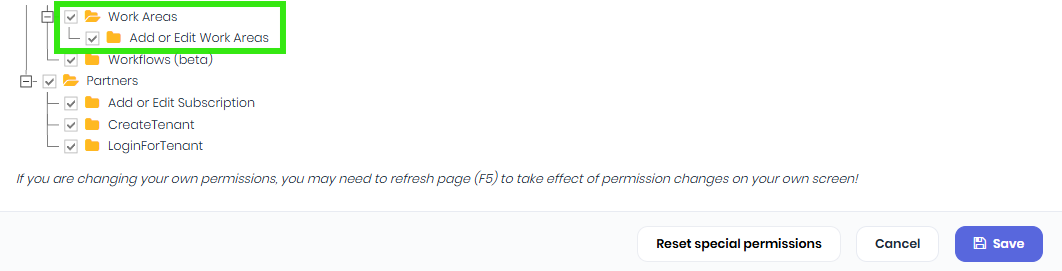
It controls:
Access to the Work Areas admin page in the main menu
Creating, editing, deleting, and reordering Work Areas
Assign this to the people who manage your workshop setup — typically operations managers or workshop leads.
What everyone else can do (no permission required)
Pick a Work Area when editing a Project, Quote, Template, or Task
View the Work Area Schedule
Drag work between Work Areas on the Schedule
See Work Area pills on detail pages and cards
Filter the Project Gantt by Work Area
This is deliberate. The whole point of Work Areas is operational — your project managers, schedulers, and floor staff all need to see and adjust assignments without admin rights.
Conditional UI
The Work Area dropdown appears on Project, Quote, Template, and Task editors only if your tenant has at least one Work Area defined. Tenants who don't use the feature won't see the field anywhere.
The same applies to the Work Area filter on the Project Gantt — hidden until you have Work Areas to filter by.
Deleting a Work Area in use
When you delete a Work Area, anything currently assigned to it has its assignment cleared, not blocked. Affected projects and tasks revert to having no Work Area and show on the Unassigned row of the Schedule. No data is lost — just the association.
What carries forward, what doesn't:
Action Carries Work Area?
Accept Quote → Project Yes — header and per-line
Create Project from Template Yes — header and per-line
Add a Task to a Quote/Project/Template Yes — if Task has a default and the line is blank
Edit upstream defaults later No — historical assignments are not retroactively changed
Manual edit on the line item Always wins, never overridden by cascades
Was this article helpful?
That’s Great!
Thank you for your feedback
Sorry! We couldn't be helpful
Thank you for your feedback
Feedback sent
We appreciate your effort and will try to fix the article