The General tab contains various settings to configure to enable specific workflows.
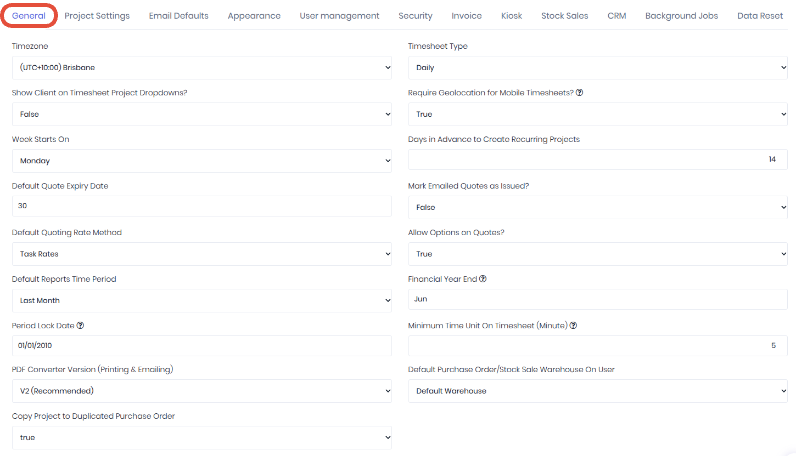
- Timezone - Select the default timezone for dates in WorkGuru. Note: Users can set their location specific timezones in their user settings.
- Timesheet Type - Select the default timesheet entry type, daily or weekly.
- Show Client on Timesheet Project Dropdown - Display the client in addition to the project/task for timesheet entry.
- Require Geolocation for Mobile Timesheets? - Enable geolocation tracking on timesheets submitted on location enabled devices.
- Week Starts On - Select which day your pay cycle starts on. This is important to match your pay-runs when importing timesheets to Xero payroll.
- Days in Advance to Create Recurring Projects - How many days before the scheduled start date do you want the recurring projects to appear in your open projects dashboard.
- Default Quote Expiry Date - Default number of days between the quote date and expiry date when adding a new quote.
- Mark Email Quotes as Issued - Setting to automatically switch the status of draft quotes to issued when they are emailed.
- Default Quoting Rate Method - Set the default quote task billable rates between task and staff.
- Allow Options on Quotes - Enable the quote option function.
- Default Reports Time Period - Set the default date range of your reports.
- Financial Year End - Set the month your financial year ends. Note: Defaults to June, end of the Australian financial year.
- Period Lock Date - Lock transactions prior to this date. Stops people adding or raising actuals on old projects and useful when matching the lock date in your accounting software.
- Minimum Time Unit on Timesheet (Minute) - Set the rounding interval on timesheets.
- PDF Converter Version (Printing & Emailing) - Revert to the older PDF converter engine if there are any issues generating PDF documents when printing document templates.
- Default Purchase Order/Stock Sale Warehouse on User - Determine the pre-filled warehouse when creating a Purchase Order or Stock Sale without context (User Warehouse Setting). For example:
- When creating a Purchase Order from a Project, the warehouse will be default based on the Project warehouse.
- When creating a Purchase Order from the “New Purchase Order” page, the warehouse will be default to the user warehouse if this setting has been set to 'User Warehouse'.
- If set to 'User Warehouse' and the user does not have a warehouse set, it will fall back to the default warehouse, same outcome as if it is set to 'Default Warehouse'.
- Copy Project to Duplicated Purchase Order - When copying a project purchase order, ensure the same project is selected
Was this article helpful?
That’s Great!
Thank you for your feedback
Sorry! We couldn't be helpful
Thank you for your feedback
Feedback sent
We appreciate your effort and will try to fix the article